Like This Site? 
 
RSS Feed Follow Us 

on Twitter! Be Our Fan!

Top 10 Free HTML5 Website Templates

Share this post!
 Vote this!


HTML5 is one of the latest web development language with many new innovative features.Web designers are working to create resources for HTML5.
Previously we have already shared Top 10 HTML5 tutorials for web designers and today here we have compiled a list of top 10 free HTML5 website templates.                       more... 

Convert Flash to HTML5 with Google Swiffy

Share this post!
 Vote this!

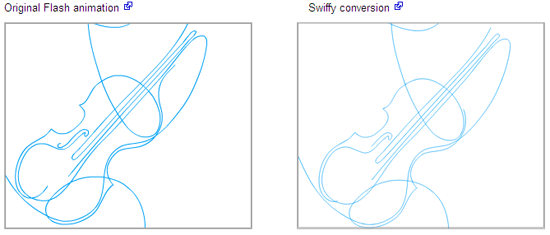
Google Swiffy is a free online tool by Google which converts Flash files(swf formats) to HTML5. This enables browsers and flash developers to use their animations without the need of the flash plugin. The browser however needs the webkit support so, it currently works on Chromium browsers and Safari (both mobile and desktop) at the moment.      more...

HTML color picker – Instant Eyedropper

Share this post!
 Vote this!

If you are a web designer or just a normal designer you must have found it hard to find the exact matching color for your designs with the surrounding picture or a website. Photoshop has a eyedropper tool but that is limited to Photoshop itself and cannot be used on other screens.             more...

10 Most Interesting New HTML5 Tags

Share this post!
 Vote this!

HTML5 provides new attributes and tags, which offers you more flexibility, power and efficiency during your Web development. This is the list of 10 tags that you have to know about. A host of new elements and attributes are brought via HTML5, which allow developers to make their documents more simple for other systems as search engines.    more...

HTML5: Creating a base template

Share this post!
 Vote this!

 The next generation of web design. I briefly mentioned the major changes that the HTML5 specification has implemented already or is in theprocess of implementing, since the full specification is not expected to be completed until 2020 or 2022. I also touched on the browser compatibility matrix for HTML5 support.             more...

CREATING HYPERLINK IN WEB INTELLIGENCE

Share this post!
 Vote this!

 Create two reports in Web Intelligence and Export both to the Central Management Server. Since the Object has to be passed to the second report, create the second report with User Prompts which is getting the objects sent from the first report.          more...

HTML For Intermediate/Advanced Level

Share this post!
 Vote this!

This guide adds a few nuts and bolts, which shouldn’t be particularly difficult as such, but will add a bit more to our understanding of HTML and enable us to do a few more things. Download tutorials below...
more... 

10 Ways to Convert A Simple HTML/CSS Website Into A Content Management System

Share this post!
 Vote this!

Have you ever wondered how to convert simple HTML Websites into a content management system (CMS) for easy management and editing? Then, this article will show you 10 easy ways to do that so much so that you will be spoilt for choice. Perhaps, one of the most common problem associated with building a cheap Website is the lack of CMS functionality which means that you have to log in to the backend or cpanel all the time just so as to make some of the most basic changes to text content or images. However, this problem can be solved by the use of simple snippets or lines of code. Better still, you can have someone or a simple Web service do all the hard work for you so that all you have to do is login to your Website and edit your Web content directly (sometimes even from the frontend). So then, the following are some of the best examples of light cms tools that will make your life  much easier.  more...

4 reasons to jump to HTML5

Share this post!
 Vote this!

Much of the coverage of HTML5 over the last couple of years has focused its role in the grand strategy of corporate combat: Will Apple standardize on HTML5? Is Google counteracting with its support of Flash? Lost in the maneuvering are the real technical accomplishments of HTML5, and the tactical opportunities they enable for individual organizations.
If you want to improve your search rankings, better support mobile readers, and transform your development process, it's time to integrate HTML5.
First, a few words of clarification. "HTML5" is not a single product in the manner of, say, the 11g release of Oracle's database management system. Instead, HTML5 is a collection of definitions, which, even in the narrowest sense, no existing Web browser fully supports, but all major Web browsers partially support.  more...

MOUSE-EVENTS.HTML

Share this post!
 Vote this!

Mouse-events.html is a template for handling three basic mouse events: Moving, pressing down on a button, and releasing the button. It works in IE 5+ and should also work in NS 6+.     more...

CSS Font and Text Style Wizard

Share this post!
 Vote this!

Welcome to the CSS Font and Text Style Wizard, brought to you due to the popularity of theHTML and CSS Table Border Style Wizard. Use this wizard to experiment with font and text styles and generate sample CSS style source code. This wizard uses dynamic HTML to change the style of the table in-situ, without loading another page. It is cross-browser compatible with Firefox, Netscape, Internet Explorer, and other modern browsers.    more...

CSS Layouts: 40+ Tutorials, Tips, Demos and Best Practices

Share this post!
 Vote this!

The main idea behind CSS-based layouts is offering more flexibility and enhancing the visual experience of visitors. Some important tips and related key-factors can help to learn basics and keep essential techniques in mind. And this is what this article is all about. Finding the perfect Layout that have Total Flexibility, Equal Height Columns and just works fine.
So we’ve decided to take a deep look at articles about CSS-based layouts and the result was a list of 40 tutorials, resources and best practices offering gorgeous and valid CSS-based Layouts.  more...

How To Create A jQuery Dropdown Div

Share this post!
 Vote this!

Welcome to our latest online tutorial, in this tutorial we look at jQuery, Css and Html to show you how easy it is to create a dropdown div using Html, Css, jQuery and only a little bit of coding!

Html Side Part Of The Tutorial

First all you need to do is insert a div just after the body tag.
Lets class the div with dropdowndiv so we know what the div is for, see example below:
<div class="dropdowndiv"></div>
Now lets put some text in it and a link to close the div as we dont want it visible all the time after we have pressed the button.
You should have something like this:  more...

10 Intelligent Ways of using [FORM] Elements

Share this post!
 Vote this!

When you combine some neat functionality courtesy of PHP with the cleverness of javascript you can produce some pretty smart results using the <form> tag. In an effort to help you take it up a notch, we’d like to share some methods for helping your site anticipate a user’s next move.
The post below is made up of 10 smart and intelligent ways of using <form> elements to produce some neat effects, components and plugins, they are all of the highest quality and more or less easy to configure. Give them a try.  more...

15 Effective Tips and Tricks from the Masters of CSS

Share this post!
 Vote this!

There are thousands of sites out there offering tips and tricks for using CSS. But how do you know where that information is coming from? Who says the people writing these “tips” know what they’re talking about? For all you know, it could be someone who has not clue what CSS even stands for, let alone how to use it effectively.
But that’s not the case with the experts below. They’re all well-known for their mastery of CSS and all that goes along with it. Read on for their tips and tricks with regards to everything from avoiding hacks to understanding the box model.  more...

HTML URL Encoding : Complete Tutorial

Share this post!
 Vote this!

URL encoding is the practice of translating unprintable characters or characters with special meaning within URLs to a representation that is unambiguous and universally accepted by web browsers and servers. These characters include:
  • ASCII control characters - Unprintable characters typically used for output control. Character ranges 00-1F hex (0-31 decimal) and 7F (127 decimal). A complete encoding table is given below.
  • Non-ASCII control characters - These are characters beyond the ASCII character set of 128 characters. This range is part of the ISO-Latin character set and ncludes the entire "top half" of the ISO-Latin set 80-FF hex (128-255 decimal). A complete encoding table is given below.  more...

50+ Very Useful CSS Techniques, Tutorials and Resources

Share this post!
 Vote this!

Learning CSS and how to use it effectively can be a reasonably easy thing to do for a beginning web developer. In the hands of a seasoned professional, CSS can be stretched and pushed it to its limits where it can seem complicated and yet perfect at the same time.
Being able to adapt to new ideas and different techniques, as well as seeking new solutions to old problems is part and parcel of being a web designer. And with the speed at which CSS development is constantly moving, keeping up with new developments can be challenging.
In this article, we’ll bring you up to date with the latest in CSS development through a collection of fresh CSS tutorials, techniques, and resources. We hope this extensive list will teach you something new, or else remind you of some methods you haven’t used for a while  more...

MIME Media Types

Share this post!
 Vote this!

MIME (Multipurpose Internet Mail Extension) media types were originally devised so that e-mails could include information other than plain text. MIME media types indicate the following things:
  • How the parts of a message, such as text and attachments, are combined into the message.
  • The way in which each part of the message is specified.
  • The way the items are encoded for transmission so that even software that was designed to work only with ASCII text can process the message.
MIME types are not just for use with e-mail; they were adopted by Web servers as a way to tell Web browsers what type of material was being sent to them so that they could cope with that kind of file correctly.  more...

HTML /XHTML Standard Fonts

Share this post!
 Vote this!

Fonts are specific to platform. If you are using different OS then you will have different look and feel of any web page. Here we are giving a list of fonts which are available to various operating systems.
HTML <FONT> tag is deprecated in version 4.0 onwards and now all fonts are set by using CSS. Here is the simple syntax of setting font of a body of web page.
body { font-family: "new century schoolbook"; }

or

<body style="font-family:new century schoolbook;" >  more...

15 CSS Habits to Develop for Frustration-Free Coding

Share this post!
 Vote this!

It’s been said that the key to a civilization’s success is mastery of the food system. Unless a group of people can effectively control the basic needs for survival, they will never achieve greatness. Likewise, before CSS skills can be expanded to an advanced level, the basics must become instinct to any CSS coder. Develop these habits and you lay a solid foundation to apply advanced CSS techniquesmore...